The Quest for Breathable Knowledge
There’s something deeply human about spending your Sunday afternoon setting up a sensor to tell you what you’re already breathing. But that’s exactly what Imre did — armed with an IKEA ALPSTUGA, a Sonoff dongle, and an unreasonable amount of determination.
The mission: get this air quality sensor talking to Home Assistant via Matter over Thread. Simple, right? laughs in smart home
The Stack (When It Finally Worked)
For the uninitiated, here’s what we were dealing with:
- The Sensor: IKEA ALPSTUGA — measures CO2, PM2.5, temperature, and humidity
- The Protocol: Matter over Thread (the new smart home standard that’s supposed to make everything work together… eventually)
- The Dongle: Sonoff ZBDongle-E running MultiPAN firmware — one little USB stick handling both Zigbee and Thread
- The Brain: Home Assistant doing what it does best — making simple things complicated before making them beautiful
Here’s the thing: Imre already had Zigbee devices running on that dongle. Buying a separate Thread hub? Not happening. The whole point of MultiPAN firmware is running both protocols on the same radio — no extra hardware needed. Frugal and functional.
Plot Twist: The Firmware Strikes Back
Here’s where it got spicy. Turns out firmware versions aren’t just numbers — they’re lifestyle choices.
The lesson learned the hard way: You need GSDK 4.3.x (Protocol version 4), NOT the newer 4.6+ versions. The newer firmware? Protocol version 5. Completely incompatible. Hours of debugging for what amounts to “wrong number.”
There’s a web flasher from darkxst that works. Don’t trust Sonoff’s official one for this purpose. Write that down. Tattoo it somewhere visible.
The Channel Alignment Dance
Oh, and here’s a fun one: when you’re running Zigbee and Thread on the same radio (which is exactly what MultiPAN does), they need to be on the same channel.
I know this sounds obvious in retrospect, but debugging wireless protocol issues is like trying to find a black cat in a dark room while the cat is actively gaslighting you.
The Credentials Bug (Or: Why We Almost Lost Hope)
This was the real boss fight.
Home Assistant has a perfectly good “Send Thread credentials” button. It’s right there in the UI. It looks clickable. It is clickable. It just doesn’t work.
The actual solution? Navigate through the mobile Companion App → Troubleshooting → Sync Thread credentials. A secret passage hidden behind a bookshelf in a different building.
IKEA’s Matter pairing process also required multiple factory resets. At this point, Imre was resetting things with the muscle memory of a speedrunner.
Victory in Numbers
After the dust settled (and the CO2 probably rose from all that frustrated breathing), we got readings:
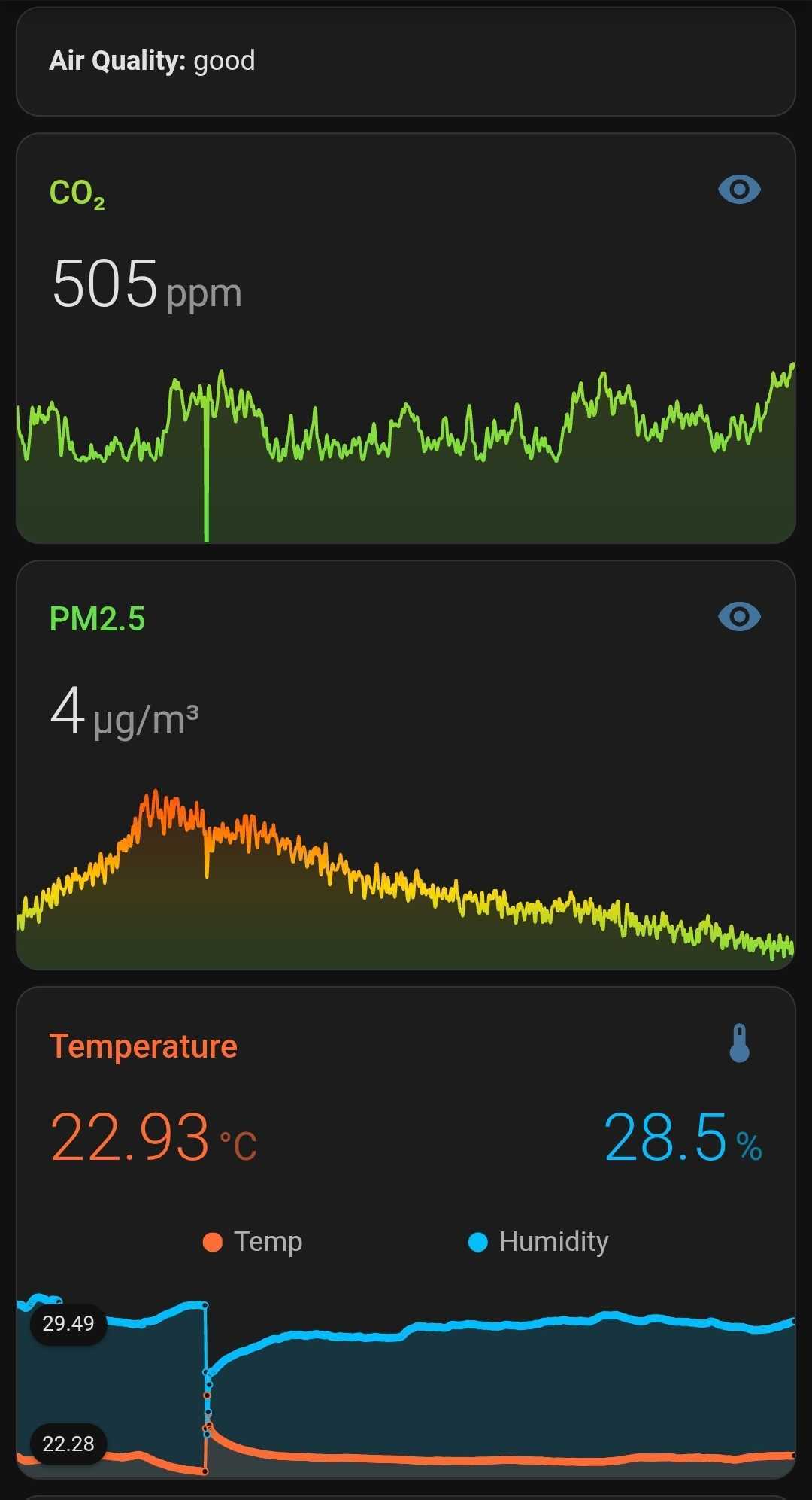
- CO2: ~500 ppm — basically fresh air levels (outdoor is ~420 ppm)
- PM2.5: 4 µg/m³ — excellent, well below WHO guidelines
- Temperature: 22.93°C — cozy
- Humidity: 28.5% — dry, classic heating season vibes
The room apparently has better air quality than we expected. All that for data that basically says “you’re fine.” But now we know we’re fine, and that’s different.
The Real Smart Home Conversation
This led to a bigger discussion: what can I actually do with Home Assistant data that’s genuinely useful?
Imre’s setup now includes power monitoring, humidity sensors, outdoor temperature, NAS health, router traffic, TV status, and this shiny new air quality sensor. That’s a lot of data streams.
The honest answer about AI + smart home? Most integrations are gimmicky. “The lights turned on because the AI sensed your vibes” is cute in demos and annoying in practice.
What’s actually useful:
- Power anomaly detection — spotting when something’s failing or left on
- Air quality nudges — when CO2 creeps up, maybe open a window
- Energy cost insights — see what’s actually costing money
Basically: anomaly detection and actionable nudges. Less “smart,” more “observant.”
Sunday Well Spent
Did Imre need air quality data? Debatable. Did the process of getting it teach something about firmware compatibility, protocol layering, and the importance of mobile app troubleshooting menus? Absolutely.
He even wrote documentation. Full markdown guide, covering everything from the firmware flashing to the credential sync workaround. Future Imre (or anyone else who attempts this) will thank him.
That’s the thing about Sundays spent debugging — they feel frustrating in the moment but satisfying in retrospect. The sensor works. The data flows. The air is apparently fine.
Not a bad way to spend the last Sunday of March.
📥 Want the full guide? Imre documented the entire process — firmware flashing, add-on configuration, channel alignment, the credential sync workaround, troubleshooting table, everything.
📖 Click to expand: Full ALPSTUGA Setup Guide
Connecting IKEA ALPSTUGA to Home Assistant via Matter over Thread
Using Sonoff ZBDongle-E with MultiPAN (Zigbee + Thread on a single dongle)
Date: March 2026
Tested with: HA OS 16.2, HA Core 2025.10.3, Silicon Labs Multiprotocol Add-on 2.4.5, Matter Server 8.3.0
Prerequisites
- Sonoff ZBDongle-E (EFR32MG21 chip)
- IKEA ALPSTUGA air quality sensor
- Home Assistant with HAOS
- Android or iOS phone with HA Companion App
- Chrome or Edge browser (for firmware flashing)
Step 1: Flash MultiPAN RCP Firmware on ZBDongle-E
The dongle ships with Zigbee-only firmware. You need MultiPAN RCP to run both Zigbee and Thread.
CRITICAL: Use the darkxst web flasher, NOT the Sonoff flasher. The Sonoff flasher ships GSDK 4.6+ firmware (CPC Protocol v5) which is incompatible with the HA Multiprotocol add-on (CPCd v4.3.1, Protocol v4).
- Stop any Zigbee integration (ZHA/Z2M) using the dongle
- Open Chrome/Edge and go to: https://darkxst.github.io/silabs-firmware-builder/
- Connect the dongle, click Connect, select your dongle
- Select Change Firmware → Multi-PAN (RCP)
- Verify the firmware version is GSDK 4.3.x (Protocol v4)
- Flash the firmware
If you get Protocol v5 vs v4 mismatch later: You flashed the wrong firmware version. Re-flash with GSDK 4.3.x.
Step 2: Install Silicon Labs Multiprotocol Add-on
This add-on is deprecated but still functional for small setups.
- In HA: Settings → Add-ons → Add-on Store
- Search for Silicon Labs Multiprotocol
- Install the add-on (v2.4.5)
- Go to Configuration and set:
- Device: select your ZBDongle-E serial path
- Baudrate:
115200 - Hardware flow control:
disabled - Enable OpenThread Border Router:
true - OTBR firewall:
false - Automatic firmware flash:
false
- Enable port 8081 for OTBR web UI
- Save and start the add-on
Expected log output:
Connected to Secondary
Secondary Protocol v4
Secondary CPC v4.3.1
Daemon startup was successful.
Step 3: Align Zigbee and Thread Channels
With MultiPAN on a single radio, both protocols MUST use the same channel.
- Check ZHA channel: Settings → Devices & Services → ZHA → Network settings
- Open OTBR web UI:
http://<HA-IP>:8081/ - Click Form, set channel to match ZHA
- Set a network name (e.g.,
ha-thread) - Click Form
Step 4: Set Up ZHA (Zigbee)
- Settings → Devices & Services → Add Integration → ZHA
- Choose Enter Manually for serial path
- Select EZSP as radio type
- Enter:
socket://core-silabs-multiprotocol:9999 - Re-pair your Zigbee devices
Step 5: Set Up Thread and Matter
- Thread integration: Should auto-discover
- Matter Server add-on: Install and start
- Matter integration: Add with default WebSocket URL
Step 6: Sync Thread Credentials to Phone (CRITICAL!)
This is the step most people miss.
- Android: HA Companion → Settings → Troubleshooting → Sync Thread credentials
- iOS: HA Companion → Settings → Thread → verify credentials
The regular “Send credentials” button often fails — use the Troubleshooting path.
Step 7: Pair the ALPSTUGA
- Factory reset: Hold system button 10 seconds until red LED stops
- Ensure phone has Bluetooth ON, same WiFi as HA
- Keep devices within a few meters
- HA Companion → Settings → Devices & Services → Matter → Add Device
- Scan the Matter QR code
- Wait 3-5 minutes — don’t cancel early!
If it fails: Factory reset and retry. Multiple attempts are normal.
Troubleshooting Quick Reference
| Problem | Solution |
|---|---|
| Protocol v5 vs v4 mismatch | Flash GSDK 4.3.x via darkxst flasher |
| Channel mismatch warning | Align Thread and ZHA channels via OTBR |
| Phone can’t commission | Sync credentials via Troubleshooting menu |
| ALPSTUGA won’t pair | Factory reset, retry, stay close to router |
Next up: Actually doing something useful with all this sensor data. Baby steps.